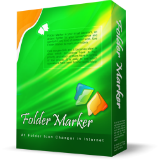
게임 소개
In the ordinary world, we’re using markers, highlighting important documents, or laying them out in folders of different colors. This allows us to be organized and quickly find the information we need. Why don’t we bring the same approach to our computer files world? This is exactly what today’s deal software is doing. This folder colorizer tool lets you add colors and/or images to Windows' folder icons. Seems trivial, right? Yet once you start using it, you'll wonder why Microsoft never bothered to incorporate such capabilities into Windows. It’s awesome. Once you have installed Folder Marker, right-click the folder you want to customize. Go to “Mark Folder” item there, and click the icon you like. That is it! Key features: * Can change a folder's color. For this purpose, you have 36 icons of normal, dark, and light colors. * Has 50 image-coded icons build-in to indicate priority, degree of work complete, work status, and the type of information contained in a folder. * Allows to sort & filter folders in Windows Explorer by assigned color- or image label. * You can customize the 'Mark Folder' menu for your needs. * Contains a User Icons tab where you can add an unlimited quantity of icons, downloaded from the Internet. * Can make customized folders distributable (portable). P.S. Please note that this is NOT the latest version of the software. Free updates are not included in the giveaway license, so please ignore the request for an update. P.P.S. For those, who used…스토어에서 원문 보기 ↗
이전 이벤트 기록
- — 무료 프로모션 시작
자주 묻는 질문
이 게임은 어떻게 받나요?
상단의 '스토어에서 무료 받기' 버튼을 누르면 해당 배포 페이지 공식 페이지가 새 창으로 열립니다. 스토어 계정으로 로그인한 뒤 받기 또는 라이브러리 추가 버튼을 누르면 됩니다. 결제 정보 입력은 필요하지 않으며, 한 번 수령하면 계정 라이브러리에 보관됩니다.
Folder Marker Home 4.8 은(는) 어떤 게임인가요?
Folder Marker Home 4.8 은(는) Giveaway of the Day에서 제공되는 작품입니다. 현재 무료로 제공되고 있습니다. 자세한 소개와 스토어 원문 설명은 아래 '게임 소개' 항목에서 확인하실 수 있습니다.
언제까지 무료로 받을 수 있나요?
이 배포는 스토어가 명시적인 종료 시각을 공지하지 않았습니다. FreeTick은 확인되지 않은 시각을 임의로 추정하지 않습니다. 정확한 상태와 종료 시각은 링크를 통해 스토어 페이지에서 확인하실 수 있습니다.
비슷한 무료 게임


더 많은 무료 게임 발견하기
매일 업데이트되는 무료 게임 큐레이션을 놓치지 마세요.
데이터 출처와 투명성
출처: Giveaway of the Day (RSS)
마지막 확인: 2026-07-08 04:33 KST
FreeTick 큐레이션 원칙 보기 →